
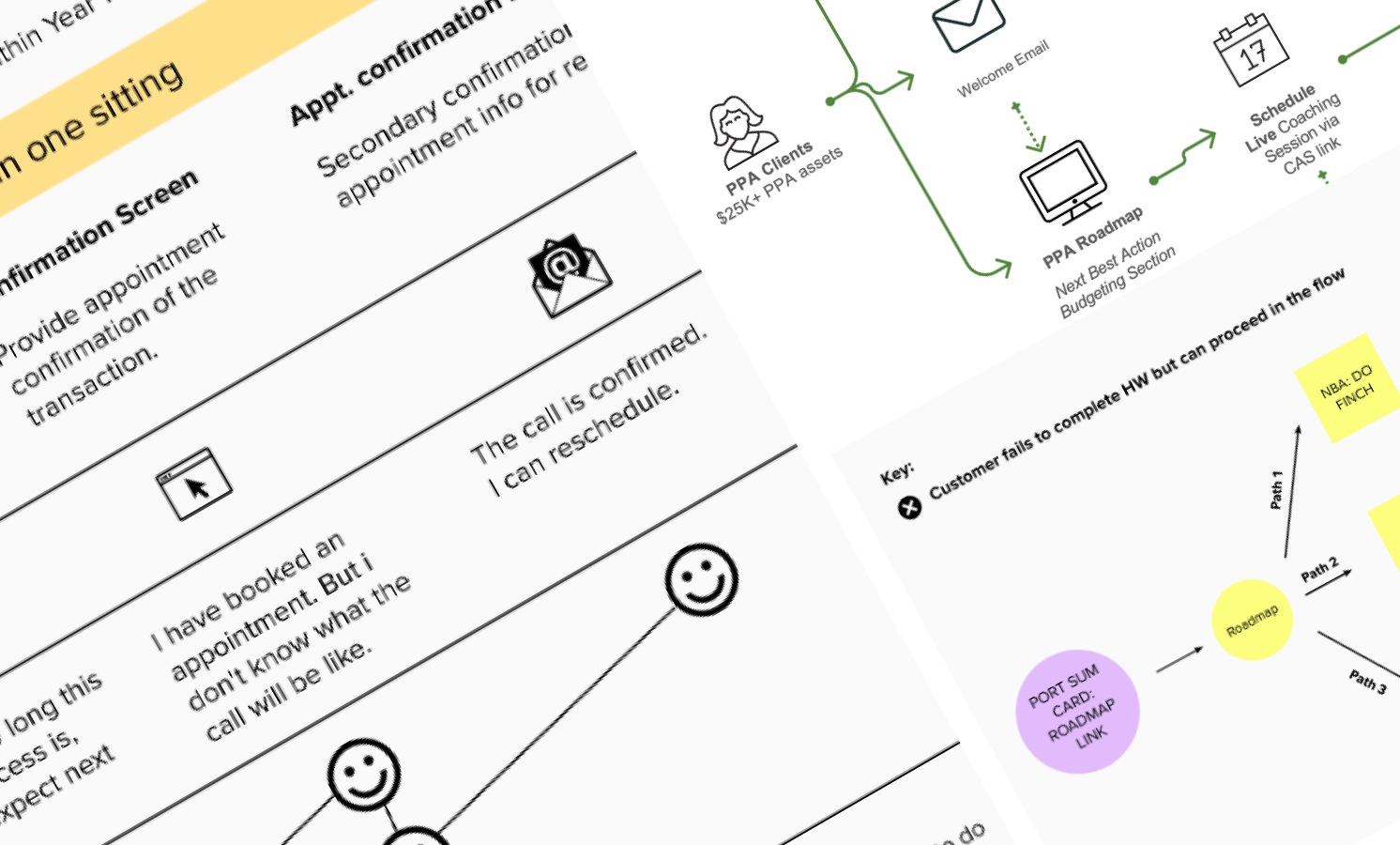
PPA / FeatureCoaching appointments
Customers were showing up to coaching calls unprepared, and reps spent the first half of every session collecting information that should have arrived in advance. I redesigned the pre-call experience across scheduling, emails, and pre-work touchpoints so conversations could start where they were meant to: the advice. Within two weeks of launch, pre-work engagement lifted 250% and reps recovered 121 hours within the first two weeks of launch.
The Team: I was the sole UX designer on this effort, working across product, engineering, and the ISR (financial rep) team. The work spanned multiple touchpoints: the scheduling flow, confirmation and reminder emails, and the Budget QuickCheck pre-work experience.
My Role: I owned the end-to-end design from research through delivery. That included mapping the full scheduling journey, running the UserZoom usability study, redesigning the automated email sequence, and improving the scheduling tool. Squad lead and business decisions sat with leadership; design direction was mine.
Objective: Increase the number of customers arriving at coaching calls prepared, so reps could spend more time on advice and less on data collection.
Success Metric: Improve pre-work engagement and reduce rep preparation time through a redesigned, automated scheduling and communication experience.
Where coaching came from
PPA was not a product handed to my squad to build. It came out of a question: what does Suzie actually need, and where is Fidelity leaving that unaddressed?
The JTBD research my squad conducted mapped Suzie's jobs, gains, and pains across her full financial life. The findings pointed to a clear gap: she needed personalized guidance on priorities, not just a dashboard. She needed someone to help her figure out where her next dollar should go. That insight became the foundation for what PPA would offer.
Coaching was one of the solutions that emerged from that whitespace work. The 1:1 coaching call with a Financial Service Representative had traditionally been reserved for clients in a much higher income bracket. The opportunity was to bring that kind of conversation within reach of Suzie's segment, structured around the specific topics she was struggling with: budgeting, spending priorities, debt, and where to invest next.
Building it required starting from scratch. There was no existing coaching experience to iterate on. Direction was taken to reuse capabilities where possible, including a scheduling tool and the Next Best Action (NBA) logic from other parts of the platform, but the coaching experience itself was created from the ground up.
Meet Suzie
Suzie is an accomplished, self-reliant woman who manages her household finances with intention. She does her research. She doesn't like feeling naïve or unprepared, and she's skeptical of advice that doesn't feel relevant to her actual situation. She wants a financial relationship built around her, not a generic product pitch.
The research surfaced a consistent theme: Suzie experiences anxiety about finances not because she lacks capability, but because the information and tools available to her don't match how she actually engages with money. She found Fidelity's digital experience hard to navigate, and the relationships felt transactional and outdated.
"I am usually pretty anxious because I am just not good at that stuff." — PPA customer research
Jobs-to-be-done research ranked her highest-priority needs by opportunity score. The top four (managing cash flow, protecting what she has, handling unexpected demands, and making progress on what matters most) all pointed to the same underlying need: confidence that she's making the right calls, without having to become a financial expert to get there.
Customers were showing up unprepared, and the calls were suffering for it
Each coaching session was structured around the customer's financial picture. Before the call, customers were asked to complete homework: a Budget QuickCheck (BQC) and FINCH data review that gave the rep the context needed to provide meaningful, personalized advice during the session.
But a high number of customers were arriving without it completed. Reps spent the first portion of each call collecting information that was supposed to be submitted in advance, leaving less time for the actual coaching. Some calls were rescheduled entirely.
"I wish I had input a lot of the data upfront, so we could spend the bulk of the time on the advice instead of information gathering." — PPA customer
At the same time, customers were asking for reps to spend less time on data collection and more time on advice. Both signals pointed to the same gap: the pre-work experience wasn't doing its job.
Mapping the full scheduling journey
The journey to a coaching call did not begin at the scheduling screen. For most customers, it started on the PPA Roadmap, the main dashboard where the Next Best Action (NBA) logic surfaced a recommended coaching session after they completed a Budget QuickCheck. That NBA card was the entry point. From there, the path moved through a scheduling tool, a confirmation screen, a manually sent e-kit, a reminder email, the call itself, and a post-call recap.
Each of these touchpoints had been built independently, by different teams, at different times. There was no unified view of how customers moved through them, and no one had mapped where they were losing context, misreading expectations, or arriving unprepared.
Two ways to arrive at a coaching call: associate-led via inbound call, or self-serve through the PPA Roadmap. Both paths converged on the same pre-work gap.
I mapped the end-to-end journey across all these touchpoints, then ran a remote usability study on UserZoom against three questions: Do customers understand they need to complete pre-work? Are the emails effective at communicating what needs to happen before the call? What obstacles do they run into with the Budget QuickCheck itself?
Mapping the full scheduling arc revealed how many independent systems a customer had to navigate, and how many moments existed to set expectations that weren't being used.
The findings pointed to three distinct failure points. First, customers had no clear expectation that pre-work was required, or what the call would involve: whether it was a phone call or screen share, what level of detail to expect, or whether a spouse could join. The roadmap and scheduling tool said nothing about it. Second, the reminder emails were not conditional: they repeated the same pre-work to-do list even after customers had already completed it, creating confusion about whether their submission had been received. Third, the Budget QuickCheck was genuinely difficult to complete without preparation. Customers did not have bills and statements in front of them, and nothing in the experience told them to gather that information before starting.
Five participant quote callouts from the UserZoom study.
A separate analysis mapped what actually happened when customers arrived at the scheduling step without having completed BQC, compared to those who had. The two paths tell the problem clearly.
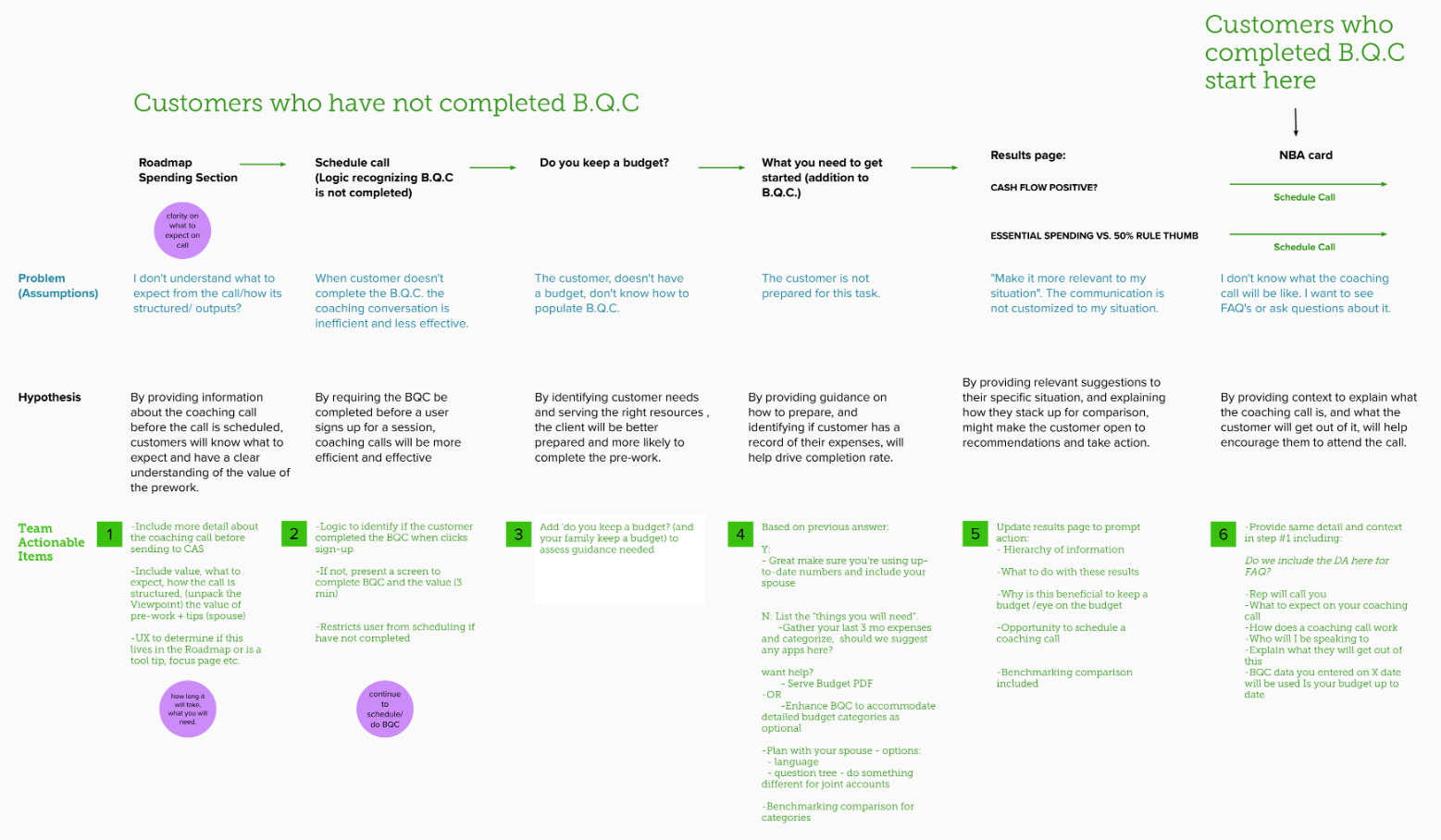
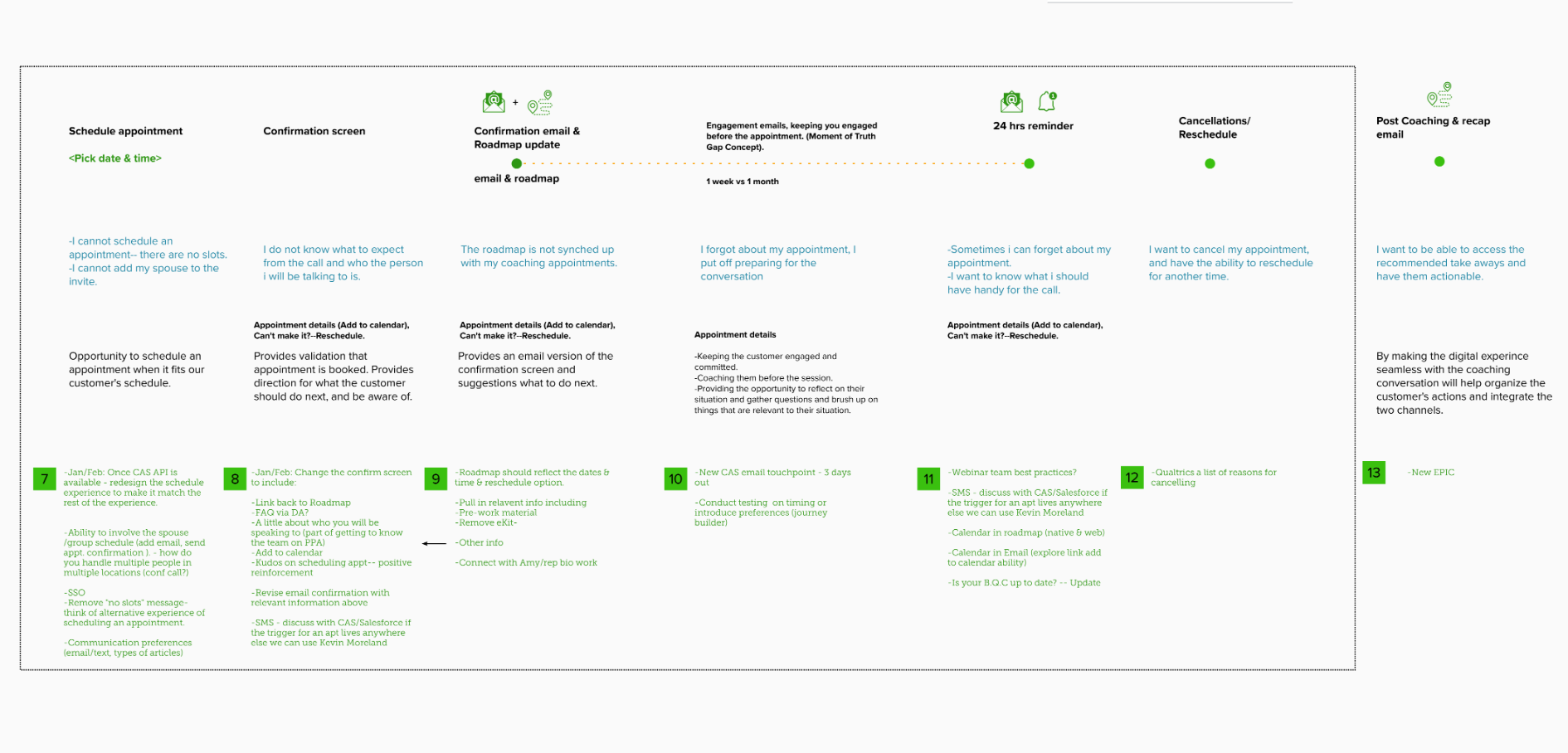
The unprepared path required customers to answer "Do you keep a budget?" as a gating question mid-flow, then work through ESSENTIAL SPENDING vs. 90% RULE guidance before they could proceed. The prepared path skipped all of that and moved directly to scheduling. The difference in friction was not subtle. The research also surfaced what customers needed to know that they were not being told: what type of call it was, who would be calling whom, whether a spouse could join, and how long the pre-work would actually take.
Fixing the experience across every touchpoint
The core insight from research was that customers wanted to be prepared. The problem was that the experience didn't give them the right information at the right time to actually do it.
The brief before the brief: Suzie's job, the business case, and what coaching could uniquely offer, documented before a single screen was drawn.
The scheduling tool itself became the first focus: wireframes explored how session selection and pre-work steps could be surfaced earlier in the flow, rather than pushed entirely to post-confirmation emails.
Session selection and pre-work surfaced earlier in the scheduling flow, so customers arrived knowing what to expect.
The bigger opportunity was in the email sequence. The original emails were manually sent by reps: time-consuming to produce, inconsistent in content, and impossible to personalize at scale. The redesign automated the full sequence: a confirmation email sent immediately after scheduling, an e-kit sent within seven days, a 24-hour reminder, and a post-call recap. Each email was written with specific, actionable instructions for what the customer needed to gather before the call, not just a reminder that pre-work existed.
Conditional logic was added to the reminder email sequence so that once a customer's BQC submission was received, the pre-work checklist was suppressed from all subsequent reminders. Customers who had completed the work would no longer receive prompts suggesting they hadn't, and the anxiety that their submission had not reached the rep was removed.
More time on advice. Less time on data collection.
250%
Lift in pre-work click-through rate in the first two weeks after launch
121 hrs
Saved for reps by automating the email sequence (15 days of work reclaimed)
3%
Improvement in pre-work completion rate (tracked for first 2 weeks)
Automating the email sequence had an immediate impact on rep workload. What had been a manual, per-appointment task was handled entirely by the system, freeing reps to focus on the coaching itself. Verbatim feedback from reps reflected an improved number of customers arriving prepared for their calls.
The 250% click-through lift captured engagement in the first two weeks. Completion rate tracking was discontinued after that period; maintaining it required too much rep time. The automation itself ensured a consistent, personalized experience for every customer regardless of rep bandwidth.
Left in the backlog
Several enhancements were identified but not shipped before my departure. SMS notifications were explored as a replacement for some of the email reminders, a more immediate channel for customers who weren't checking email consistently. A calendar widget was scoped to surface appointment details directly in the customer's calendar app. And the logic to remove pre-work content from the reminder email once completed (validated in research) was prioritized for the next development cycle.
The appointments work also informed a longer-term vision for how the coaching relationship could persist beyond a single call. A future state design explored a post-login coaching page where returning customers could access session notes, action items, and a history of past coaching conversations, turning a transactional scheduling experience into an ongoing advisory relationship.
© 2026 Julia Barbosa. All Rights Reserved.